自定义策略图
策略图是 Koog 框架中智能体工作流程的骨干。它们定义了智能体如何处理输入、与工具交互以及生成输出。策略图由通过边连接的节点组成,执行流程由条件决定。
创建策略图可以让您根据具体需求定制智能体的行为,无论是构建简单的聊天机器人、复杂的数据处理流水线,还是介于两者之间的任何应用。
策略图架构
从高层次来看,策略图包含以下组件:
- 策略:图的顶级容器,使用
strategy函数创建,并通过泛型参数指定输入和输出类型。 - 子图:图中可以拥有自己工具集和上下文的部分。
- 节点:工作流程中的独立操作或转换步骤。
- 边:节点之间的连接,定义转移条件和转换逻辑。
策略图从名为 nodeStart 的特殊节点开始,到 nodeFinish 结束。这些节点之间的路径由图中定义的边和条件决定。
策略图组件
节点
节点是策略图的基本构建块。每个节点代表一个特定的操作。
Koog 框架提供了预定义节点,同时也允许您使用 node 函数创建自定义节点。
边
边连接节点并定义策略图中的操作流程。边通过 edge 函数和 forwardTo 中缀函数创建:
条件
条件决定策略图中何时遵循特定边。条件有多种类型,以下是一些常见类型:
| 条件类型 | 描述 |
|---|---|
| onCondition | 通用条件,接受返回布尔值的lambda表达式。 |
| onToolCall | 当 LLM 调用工具时匹配的条件。 |
| onAssistantMessage | 当 LLM 以消息响应时匹配的条件。 |
| onMultipleToolCalls | 当 LLM 调用多个工具时匹配的条件。 |
| onToolNotCalled | 当 LLM 未调用工具时匹配的条件。 |
您可以使用 transformed 函数在将输出传递给目标节点之前进行转换:
=== "Kotlin"
edge(sourceNode forwardTo targetNode
        onCondition { input -> input.length > 10 }
        transformed { input -> input.uppercase() }
)
子图
子图是策略图中使用其自身工具集和上下文进行操作的独立部分。
一个策略图可以包含多个子图。每个子图通过使用 subgraph 函数来定义:
var firstSubgraph = AIAgentSubgraph.builder("first")
    .withInput(FirstInput.class)
    .withOutput(FirstOutput.class)
    .define(subgraph -> {
        // 为此子图定义节点和边
    })
    .build();

var secondSubgraph = AIAgentSubgraph.builder("second")
    .withInput(SecondInput.class)
    .withOutput(SecondOutput.class)
    .define(subgraph -> {
        // 为此子图定义节点和边
    })
    .build();
子图可以使用工具注册表中的任何工具。
但是,您可以指定该注册表中可用于子图的工具子集,并将其作为参数传递给 subgraph 函数:
基础策略图创建
基础策略图按以下方式运行:
- 将输入发送给 LLM。
- 如果 LLM 回复了一条消息,则结束流程。
- 如果 LLM 调用了一个工具,则运行该工具。
- 将工具结果发送回 LLM。
- 如果 LLM 回复了一条消息,则结束流程。
- 如果 LLM 调用了另一个工具,则运行该工具,并从步骤 4 开始重复该过程。
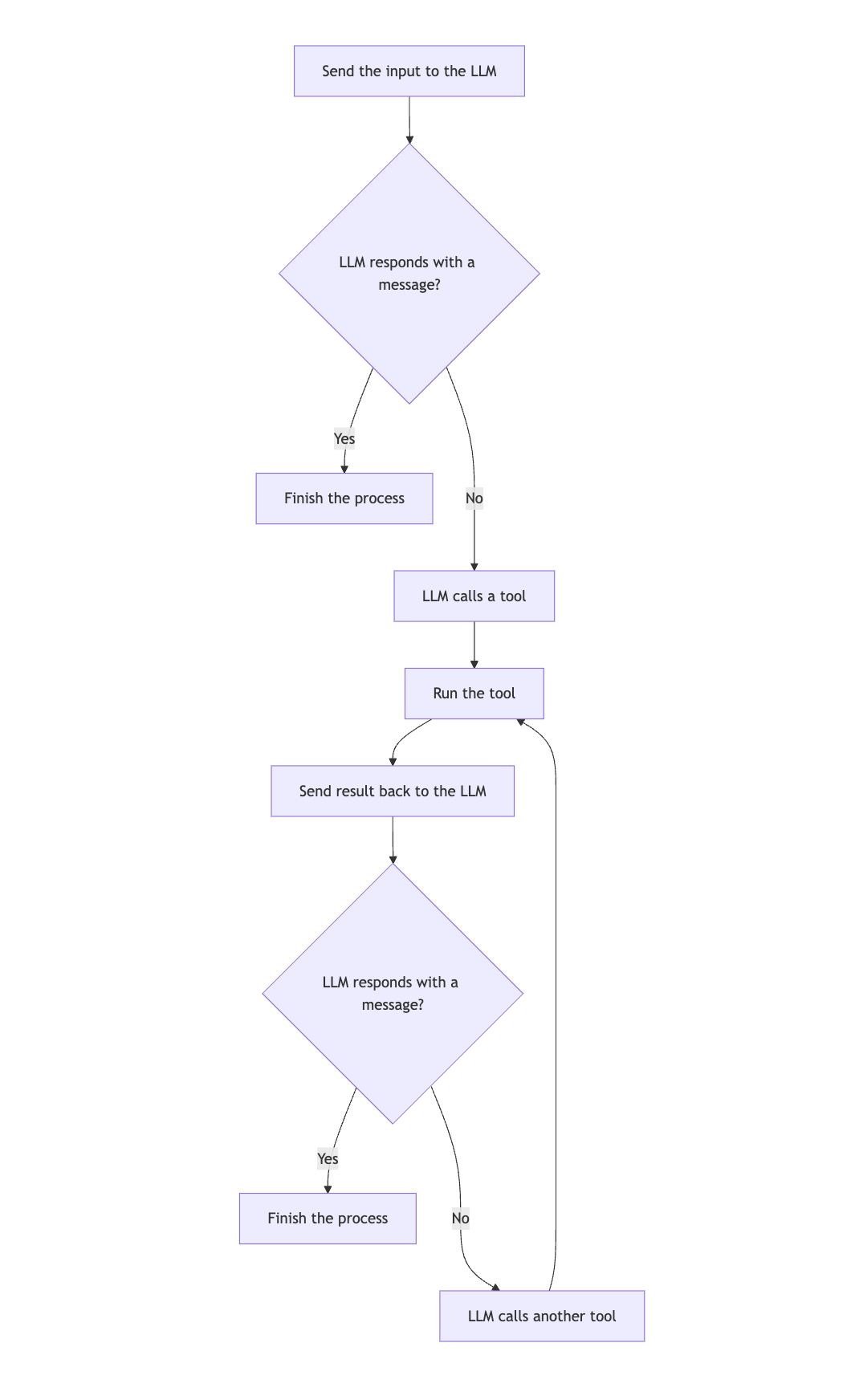 以下是一个基础策略图的示例:
val myStrategy = strategy<String, String>("my-strategy") {
    val nodeCallLLM by nodeLLMRequest()
    val executeToolCall by nodeExecuteTool()
    val sendToolResult by nodeLLMSendToolResult()

    edge(nodeStart forwardTo nodeCallLLM)
    edge(nodeCallLLM forwardTo nodeFinish onAssistantMessage { true })
    edge(nodeCallLLM forwardTo executeToolCall onToolCall { true })
    edge(executeToolCall forwardTo sendToolResult)
    edge(sendToolResult forwardTo nodeFinish onAssistantMessage { true })
    edge(sendToolResult forwardTo executeToolCall onToolCall { true })
}
var graph = AIAgentGraphStrategy.builder("single_run")
    .withInput(String.class)
    .withOutput(String.class);

var nodeCallLLM = AIAgentNode.llmRequest(true, "sendInput");
var nodeExecuteTool = AIAgentNode.executeTool("nodeExecuteTool");
var nodeSendToolResult = AIAgentNode.llmSendToolResult("nodeSendToolResult");

graph.edge(graph.nodeStart, nodeCallLLM);

graph.edge(AIAgentEdge.builder()
    .from(nodeCallLLM)
    .to(nodeExecuteTool)
    .onIsInstance(Message.Tool.Call.class)
    .build());

graph.edge(AIAgentEdge.builder()
    .from(nodeCallLLM)
    .to(graph.nodeFinish)
    .onIsInstance(Message.Assistant.class)
    .transformed(Message.Assistant::getContent)
    .build());

graph.edge(nodeExecuteTool, nodeSendToolResult);

graph.edge(AIAgentEdge.builder()
    .from(nodeSendToolResult)
    .to(graph.nodeFinish)
    .onIsInstance(Message.Assistant.class)
    .transformed(Message.Assistant::getContent)
    .build());

graph.edge(AIAgentEdge.builder()
    .from(nodeSendToolResult)
    .to(nodeExecuteTool)
    .onIsInstance(Message.Tool.Call.class)
    .build());

var strategy = graph.build();
可视化策略图
在 JVM 上,你可以为策略图生成 Mermaid 状态图。
对于前面示例中创建的图,你可以运行:
输出结果将是:
---
title: my-strategy
---
stateDiagram
    state "nodeCallLLM" as nodeCallLLM
    state "executeToolCall" as executeToolCall
    state "sendToolResult" as sendToolResult

    [*] --> nodeCallLLM
    nodeCallLLM --> [*] : transformed
    nodeCallLLM --> executeToolCall : onCondition
    executeToolCall --> sendToolResult
    sendToolResult --> [*] : transformed
    sendToolResult --> executeToolCall : onCondition
高级策略技巧
历史压缩
对于长时间运行的对话,历史记录可能会变得庞大并消耗大量令牌。要了解如何压缩历史记录,请参阅历史压缩。
并行工具执行
对于需要并行执行多个工具的工作流,你可以使用 nodeExecuteMultipleTools 节点:
val executeMultipleTools by nodeExecuteMultipleTools()
val processMultipleResults by nodeLLMSendMultipleToolResults()

edge(someNode forwardTo executeMultipleTools)
edge(executeMultipleTools forwardTo processMultipleResults)
您也可以使用 toParallelToolCallsRaw 扩展函数进行数据流式处理:
要了解更多信息,请参阅工具。
并行节点执行
并行节点执行允许您同时运行多个节点,从而提高性能并支持复杂的工作流。
要启动并行节点运行,请使用 parallel 方法:
val calc by parallel<String, Int>(
    nodeCalcTokens, nodeCalcSymbols, nodeCalcWords,
) {
    selectByMax { it }
}
以上代码创建了一个名为 calc 的节点,该节点并行运行 nodeCalcTokens、nodeCalcSymbols 和 nodeCalcWords 节点,并将结果作为 AsyncParallelResult 的实例返回。
有关并行节点执行的更多信息和详细参考,请参阅并行节点执行。
条件分支
对于需要根据特定条件选择不同路径的复杂工作流,您可以使用条件分支:
val branchA by node<String, String> { input ->
    // Logic for branch A
    "Branch A: $input"
}

val branchB by node<String, String> { input ->
    // Logic for branch B
    "Branch B: $input"
}

edge(
    (someNode forwardTo branchA)
            onCondition { input -> input.contains("A") }
)
edge(
    (someNode forwardTo branchB)
            onCondition { input -> input.contains("B") }
)
最佳实践
创建自定义策略图时,请遵循以下最佳实践:
- 保持简单。从简单的图开始,根据需要逐步增加复杂性。
- 为节点和边使用描述性名称,使图更易于理解。
- 处理所有可能的路径和边界情况。
- 使用各种输入测试您的图,确保其行为符合预期。
- 记录图的目的和行为,以便将来参考。
- 使用预定义策略或常见模式作为起点。
- 对于长时间运行的对话,使用历史压缩来减少令牌使用。
- 使用子图来组织您的图并管理工具访问。
使用示例
语气分析策略
语气分析策略是一个包含历史压缩的基于工具策略的良好示例:
fun toneStrategy(name: String, toolRegistry: ToolRegistry): AIAgentGraphStrategy<String, String> {
    return strategy(name) {
        val nodeSendInput by nodeLLMRequest()
        val nodeExecuteTool by nodeExecuteTool()
        val nodeSendToolResult by nodeLLMSendToolResult()
        val nodeCompressHistory by nodeLLMCompressHistory<ReceivedToolResult>()

        // Define the flow of the agent
        edge(nodeStart forwardTo nodeSendInput)

        // If the LLM responds with a message, finish
        edge(
            (nodeSendInput forwardTo nodeFinish)
                    onAssistantMessage { true }
        )

        // If the LLM calls a tool, execute it
        edge(
            (nodeSendInput forwardTo nodeExecuteTool)
                    onToolCall { true }
        )

        // If the history gets too large, compress it
        edge(
            (nodeExecuteTool forwardTo nodeCompressHistory)
                    onCondition { _ -> llm.readSession { prompt.messages.size > 100 } }
        )

        edge(nodeCompressHistory forwardTo nodeSendToolResult)

        // Otherwise, send the tool result directly
        edge(
            (nodeExecuteTool forwardTo nodeSendToolResult)
                    onCondition { _ -> llm.readSession { prompt.messages.size <= 100 } }
        )

        // If the LLM calls another tool, execute it
        edge(
            (nodeSendToolResult forwardTo nodeExecuteTool)
                    onToolCall { true }
        )

        // If the LLM responds with a message, finish
        edge(
            (nodeSendToolResult forwardTo nodeFinish)
                    onAssistantMessage { true }
        )
    }
}
该策略执行以下操作:
- 将输入发送到 LLM。
- 如果 LLM 以消息响应,则策略完成处理。
- 如果 LLM 调用工具,则策略运行该工具。
- 如果历史记录过大(超过 100 条消息),策略会在发送工具结果之前压缩历史记录。
- 否则,策略直接发送工具结果。
- 如果 LLM 调用另一个工具,策略会运行它。
- 如果 LLM 以消息响应,则策略完成处理。
故障排除
创建自定义策略图时,您可能会遇到一些常见问题。以下是一些故障排除提示:
图无法到达结束节点
如果您的图无法到达结束节点,请检查以下内容:
- 从起始节点出发的所有路径最终都通向结束节点。
- 您的条件限制性不强,不会阻止边的跟随。
- 图中没有无退出条件的循环。
工具调用未运行
如果工具调用未运行,请检查以下内容:
- 工具已在工具注册表中正确注册。
- 从 LLM 节点到工具执行节点的边具有正确的条件(
onToolCall { true })。
历史记录过大
如果您的历史记录过大并消耗过多令牌,请考虑以下建议:- 添加一个历史压缩节点。
- 使用条件检查历史记录的大小,并在过大时进行压缩。
- 采用更激进的压缩策略(例如,使用更小N值的 FromLastNMessages)。
图行为异常
如果你的图执行了意外的分支,请检查以下内容:
- 你的条件定义是否正确。
- 条件是否按预期顺序评估(边按定义顺序检查)。
- 你是否意外地用更通用的条件覆盖了原有条件。
出现性能问题
如果你的图出现性能问题,请考虑以下建议:
- 通过移除不必要的节点和边来简化图结构。
- 对独立操作使用并行工具执行。
- 压缩历史记录。
- 使用更高效的节点和操作。