预定义智能体策略
为简化智能体实现,Koog 针对常见智能体使用场景提供了预定义策略。 当前可用的预定义策略包括:
对话智能体策略
对话智能体策略专为执行对话交互流程而设计。 它协调不同阶段、节点和工具之间的交互,以处理用户输入、执行工具并以类对话方式提供响应。
概述
对话智能体策略实现以下模式:
- 接收用户输入
- 通过 LLM 处理输入
- 调用工具或直接提供响应
- 处理工具结果并继续对话
- 当 LLM 尝试以纯文本而非工具调用方式响应时提供反馈
该方法创建了一个对话式界面,使智能体能够使用工具来满足用户请求。
设置与依赖
在 Koog 中,对话智能体策略通过 chatAgentStrategy 函数实现。要在智能体代码中使用该函数,需添加以下依赖导入:
使用该策略时,请按以下模式创建 AI 智能体:
val chatAgent = AIAgent(
    promptExecutor = promptExecutor,
    toolRegistry = toolRegistry,
    llmModel = model,
    // Set chatAgentStrategy as the agent strategy
    strategy = chatAgentStrategy()
)
适用场景
对话智能体策略特别适用于:
- 构建需要使用工具的对话型智能体
- 创建能根据用户请求执行操作的助手
- 实现需要访问外部系统或数据的聊天机器人
- 需要强制使用工具而非纯文本响应的场景
示例
以下是一个实现预定义对话智能体策略(chatAgentStrategy)的 AI 智能体代码示例,包含智能体可能使用的工具:
val chatAgent = AIAgent(
    promptExecutor = promptExecutor,
    llmModel = model,
    // Use chatAgentStrategy as the agent strategy
    strategy = chatAgentStrategy(),
    // Add tools the agent can use
    toolRegistry = ToolRegistry {
        tool(searchTool)
        tool(weatherTool)
    }
)

suspend fun main() {
    // Run the agent with a user query
    val result = chatAgent.run("What's the weather like today and should I bring an umbrella?")
}
ReAct 策略
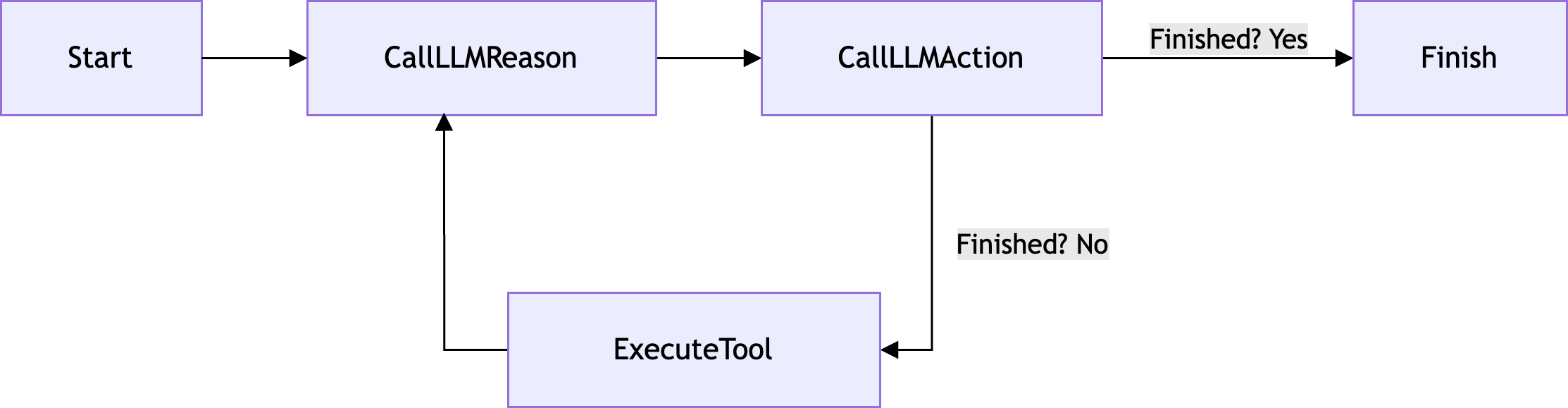
ReAct(推理与执行)策略是一种 AI 智能体策略,通过在推理与执行阶段之间交替进行,动态处理任务并向大语言模型(LLM)请求输出。
概述
ReAct 策略实现以下模式:
- 推理当前状态并规划后续步骤
- 基于推理采取行动
- 观察行动结果
- 重复该循环
该方法结合了推理(逐步思考问题)与执行(调用工具收集信息或执行操作)的优势。
流程图
以下是 ReAct 策略的流程图:
设置与依赖
在 Koog 中,ReAct 策略通过 reActStrategy 函数实现。要在智能体代码中使用该函数,需添加以下依赖导入:
使用该策略时,请按以下模式创建 AI 智能体:
val reActAgent = AIAgent(
    promptExecutor = promptExecutor,
    toolRegistry = toolRegistry,
    llmModel = model,
    // Set reActStrategy as the agent strategy
    strategy = reActStrategy(
        // Set optional parameter values
        reasoningInterval = 1,
        name = "react_agent"
    )
)
参数
reActStrategy 函数接受以下参数:| 参数 | 类型 | 默认值 | 描述 |
|---------------------|--------|----------|---------------------------------------------------------------------|
| reasoningInterval | 整型 | 1 | 指定推理步骤的间隔。必须大于0。 |
| name | 字符串 | re_act | 策略的名称。 |
使用示例
以下是一个简单银行智能体使用 ReAct 策略的示例:
1. 用户输入
用户发送初始提示。例如,这可以是一个类似 How much did I spend last month? 的问题。
2. 推理
智能体通过用户输入和推理提示进行初始推理。推理过程可能如下所示:
I need to follow these steps:
1. Get all transactions from last month
2. Filter out deposits (positive amounts)
3. Calculate total spending
3. 行动与执行,第一阶段
基于智能体在上一步中定义的行动项,它运行一个工具来获取上个月的所有交易记录。
在本例中,运行的工具是 get_transactions,同时附带已定义的 startDate 和 endDate 参数,这些参数匹配获取上个月所有交易记录的请求:
工具返回的结果可能如下所示:
[
  {date: "2025-05-25", amount: -100.00, description: "Grocery Store"},
  {date: "2025-05-31", amount: +1000.00, description: "Salary Deposit"},
  {date: "2025-06-10", amount: -500.00, description: "Rent Payment"},
  {date: "2025-06-13", amount: -200.00, description: "Utilities"}
]
4. 推理
根据工具返回的结果,智能体再次进行推理以确定其流程中的后续步骤:
I have the transactions. Now I need to:
1. Remove the salary deposit of +1000.00
2. Sum up the remaining transactions
5. 行动与执行,第二阶段
基于之前的推理步骤,智能体调用 calculate_sum 工具,该工具对作为工具参数提供的金额进行求和。由于推理还得出需要从交易记录中排除正数金额的行动点,因此作为工具参数提供的金额仅包含负数:
工具返回最终结果:
6. 最终响应
智能体返回最终响应(助手消息),其中包含计算出的总和:
何时使用 ReAct 策略
ReAct 策略特别适用于:
- 需要多步推理的复杂任务
- 智能体在提供最终答案前需要收集信息的场景
- 适合分解为多个小步骤的问题
- 需要分析思维与工具使用相结合的任务
代码示例
以下是一个实现预定义 ReAct 策略(reActStrategy)的 AI 智能体代码示例,以及智能体可能使用的工具:
val bankingAgent = AIAgent(
    promptExecutor = promptExecutor,
    llmModel = model,
    // Use reActStrategy as the agent strategy
    strategy = reActStrategy(
        reasoningInterval = 1,
        name = "banking_agent"
    ),
    // Add tools the agent can use
    toolRegistry = ToolRegistry {
        tool(getTransactions)
        tool(calculateSum)
    }
)

suspend fun main() {
    // Run the agent with a user query
    val result = bankingAgent.run("How much did I spend last month?")
}